> ## Documentation Index
> Fetch the complete documentation index at: https://docs-staging-chore-gt-workflow.mintlify.site/llms.txt
> Use this file to discover all available pages before exploring further.

> Learn how to configure your HTTP Vault Connections to authorize HTTP requests to external APIs or services.

# HTTP Vault Connection

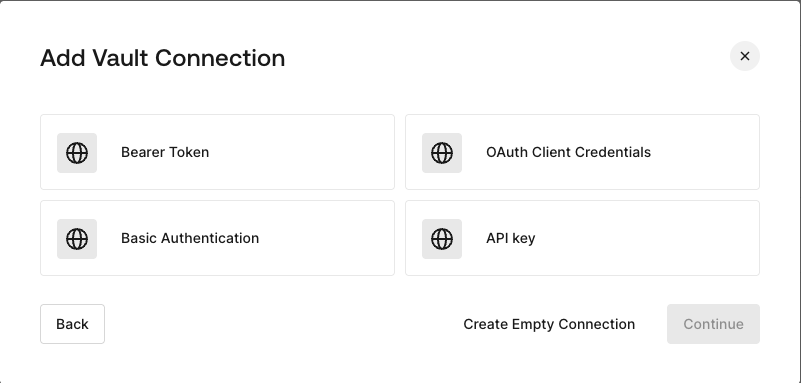
## Configure your HTTP Vault Connection Options

HTTP Vault Connection can be configure with different authentication options and then be used at your HTTP Request Flow Actions.
<Frame>
  <img src="https://mintcdn.com/docs-staging-chore-gt-workflow/PzoOIgRpU65TZp7z/docs/images/customize/forms/vaults/http-vault-connection-options.png?fit=max&auto=format&n=PzoOIgRpU65TZp7z&q=85&s=348e4e9a08227dfe4388538848262e93" alt="Dashboard > Actions > Forms > Vault > HTTP" data-og-width="801" width="801" data-og-height="383" height="383" data-path="docs/images/customize/forms/vaults/http-vault-connection-options.png" data-optimize="true" data-opv="3" srcset="https://mintcdn.com/docs-staging-chore-gt-workflow/PzoOIgRpU65TZp7z/docs/images/customize/forms/vaults/http-vault-connection-options.png?w=280&fit=max&auto=format&n=PzoOIgRpU65TZp7z&q=85&s=e6e2817559b5a3c447b47ceea611ecf4 280w, https://mintcdn.com/docs-staging-chore-gt-workflow/PzoOIgRpU65TZp7z/docs/images/customize/forms/vaults/http-vault-connection-options.png?w=560&fit=max&auto=format&n=PzoOIgRpU65TZp7z&q=85&s=c0f0003e854376e3f50e4d7b24fdc090 560w, https://mintcdn.com/docs-staging-chore-gt-workflow/PzoOIgRpU65TZp7z/docs/images/customize/forms/vaults/http-vault-connection-options.png?w=840&fit=max&auto=format&n=PzoOIgRpU65TZp7z&q=85&s=a3640ac88ab6d094445a5067a469ea7d 840w, https://mintcdn.com/docs-staging-chore-gt-workflow/PzoOIgRpU65TZp7z/docs/images/customize/forms/vaults/http-vault-connection-options.png?w=1100&fit=max&auto=format&n=PzoOIgRpU65TZp7z&q=85&s=530efaed86a901e06b42f60f25cea7c9 1100w, https://mintcdn.com/docs-staging-chore-gt-workflow/PzoOIgRpU65TZp7z/docs/images/customize/forms/vaults/http-vault-connection-options.png?w=1650&fit=max&auto=format&n=PzoOIgRpU65TZp7z&q=85&s=00fc5487e5d8ca3ae96d8f54252a1a7d 1650w, https://mintcdn.com/docs-staging-chore-gt-workflow/PzoOIgRpU65TZp7z/docs/images/customize/forms/vaults/http-vault-connection-options.png?w=2500&fit=max&auto=format&n=PzoOIgRpU65TZp7z&q=85&s=e39fa10ceace95dc345c4ce953e10a27 2500w" />
</Frame>

## Configure your HTTP Vault Connection for Bearer Token

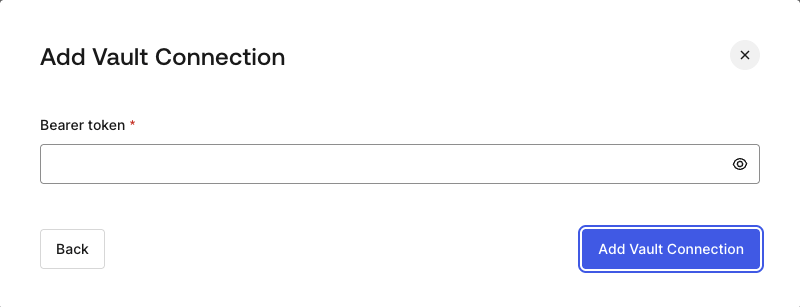
To configure a HTTP Vault Connection using **Bearer Token** authorization, you need to set the required parameters.
<Frame>
  <img src="https://mintcdn.com/docs-staging-chore-gt-workflow/PzoOIgRpU65TZp7z/docs/images/customize/forms/vaults/http-vault-connection-bearer-token.png?fit=max&auto=format&n=PzoOIgRpU65TZp7z&q=85&s=44bf3debf9e62973adbe1c94368ad632" alt="Dashboard > Actions > Forms > Vault > HTTP" data-og-width="800" width="800" data-og-height="307" height="307" data-path="docs/images/customize/forms/vaults/http-vault-connection-bearer-token.png" data-optimize="true" data-opv="3" srcset="https://mintcdn.com/docs-staging-chore-gt-workflow/PzoOIgRpU65TZp7z/docs/images/customize/forms/vaults/http-vault-connection-bearer-token.png?w=280&fit=max&auto=format&n=PzoOIgRpU65TZp7z&q=85&s=34657efcc7095753c7c77e4acc3a48fa 280w, https://mintcdn.com/docs-staging-chore-gt-workflow/PzoOIgRpU65TZp7z/docs/images/customize/forms/vaults/http-vault-connection-bearer-token.png?w=560&fit=max&auto=format&n=PzoOIgRpU65TZp7z&q=85&s=1ab2045f34e7257d0436956fd4896ee7 560w, https://mintcdn.com/docs-staging-chore-gt-workflow/PzoOIgRpU65TZp7z/docs/images/customize/forms/vaults/http-vault-connection-bearer-token.png?w=840&fit=max&auto=format&n=PzoOIgRpU65TZp7z&q=85&s=a78fbc3dfe0014f9de5ac90857b04aab 840w, https://mintcdn.com/docs-staging-chore-gt-workflow/PzoOIgRpU65TZp7z/docs/images/customize/forms/vaults/http-vault-connection-bearer-token.png?w=1100&fit=max&auto=format&n=PzoOIgRpU65TZp7z&q=85&s=da9f96c2220aa098a3f8e87ed8b65fb5 1100w, https://mintcdn.com/docs-staging-chore-gt-workflow/PzoOIgRpU65TZp7z/docs/images/customize/forms/vaults/http-vault-connection-bearer-token.png?w=1650&fit=max&auto=format&n=PzoOIgRpU65TZp7z&q=85&s=e529f0155637edd2b35dd320ba4f26dc 1650w, https://mintcdn.com/docs-staging-chore-gt-workflow/PzoOIgRpU65TZp7z/docs/images/customize/forms/vaults/http-vault-connection-bearer-token.png?w=2500&fit=max&auto=format&n=PzoOIgRpU65TZp7z&q=85&s=2ba6d96b992a370f04138c3ce7ec4e52 2500w" />
</Frame>

### Input settings

| Parameter    | Description                                           |
| ------------ | ----------------------------------------------------- |
| Bearer Token | Static token used for external service authorization. |

## Configure your HTTP Vault Connection for OAuth Client Credentials

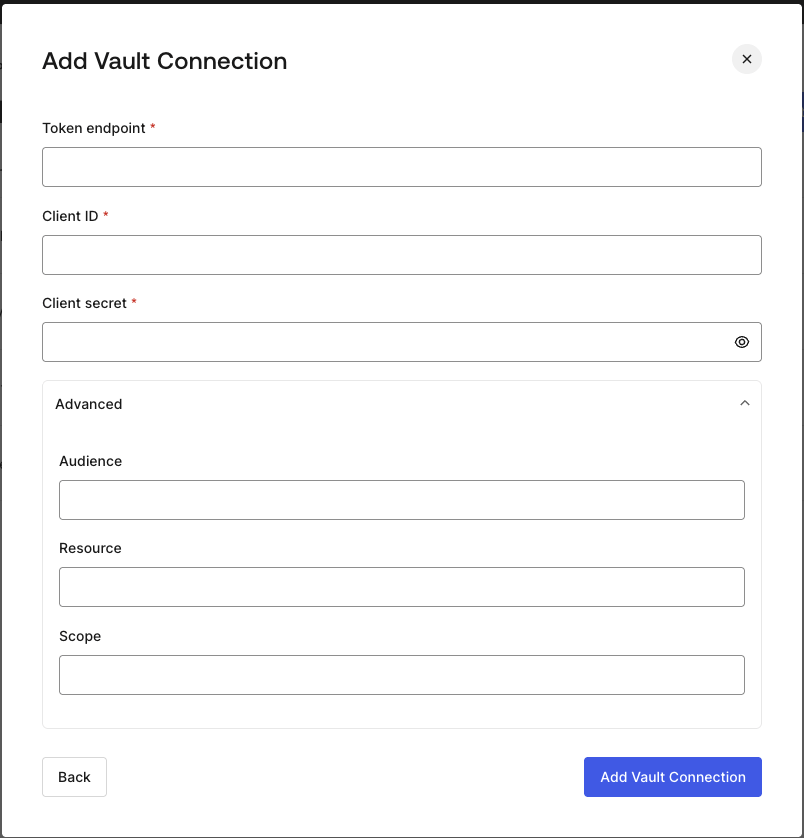
To configure a HTTP Vault Connection using **Client Credentials** authorization, you need to set the required parameters.
<Frame>
  <img src="https://mintcdn.com/docs-staging-chore-gt-workflow/PzoOIgRpU65TZp7z/docs/images/customize/forms/vaults/http-vault-connection-oauth-client-credentials.png?fit=max&auto=format&n=PzoOIgRpU65TZp7z&q=85&s=e38917508c5340a67d22e384c03cc850" alt="Dashboard > Actions > Forms > Vault > HTTP " data-og-width="804" width="804" data-og-height="838" height="838" data-path="docs/images/customize/forms/vaults/http-vault-connection-oauth-client-credentials.png" data-optimize="true" data-opv="3" srcset="https://mintcdn.com/docs-staging-chore-gt-workflow/PzoOIgRpU65TZp7z/docs/images/customize/forms/vaults/http-vault-connection-oauth-client-credentials.png?w=280&fit=max&auto=format&n=PzoOIgRpU65TZp7z&q=85&s=d937b6976d063e8f951880431a442a2b 280w, https://mintcdn.com/docs-staging-chore-gt-workflow/PzoOIgRpU65TZp7z/docs/images/customize/forms/vaults/http-vault-connection-oauth-client-credentials.png?w=560&fit=max&auto=format&n=PzoOIgRpU65TZp7z&q=85&s=8f42e1e2324f1609690a9a2dc7c5ba80 560w, https://mintcdn.com/docs-staging-chore-gt-workflow/PzoOIgRpU65TZp7z/docs/images/customize/forms/vaults/http-vault-connection-oauth-client-credentials.png?w=840&fit=max&auto=format&n=PzoOIgRpU65TZp7z&q=85&s=ea58dd144eab5ab8d66c100677d700c5 840w, https://mintcdn.com/docs-staging-chore-gt-workflow/PzoOIgRpU65TZp7z/docs/images/customize/forms/vaults/http-vault-connection-oauth-client-credentials.png?w=1100&fit=max&auto=format&n=PzoOIgRpU65TZp7z&q=85&s=ea0a063749c622412b70797d97a8b04b 1100w, https://mintcdn.com/docs-staging-chore-gt-workflow/PzoOIgRpU65TZp7z/docs/images/customize/forms/vaults/http-vault-connection-oauth-client-credentials.png?w=1650&fit=max&auto=format&n=PzoOIgRpU65TZp7z&q=85&s=f2a635892dc0ce2e68eae533c19dee49 1650w, https://mintcdn.com/docs-staging-chore-gt-workflow/PzoOIgRpU65TZp7z/docs/images/customize/forms/vaults/http-vault-connection-oauth-client-credentials.png?w=2500&fit=max&auto=format&n=PzoOIgRpU65TZp7z&q=85&s=0d8731247c6b95e3f35e3a7c56ec6162 2500w" />
</Frame>

### Input settings

| Parameter           | Description                                                               |
| ------------------- | ------------------------------------------------------------------------- |
| Tenant Endpoint     | Tenant Endpoint of the Authorization Server issuing the Access Tokens.    |
| Client ID           | Client ID of your M2M Application authorized for Custom API.              |
| Client Secret       | Client Secret of your M2M Application authorized for Custom API.          |
| Audience (Optional) | Custom API Audience. Normally used for Custom APIs defined in Auth0.      |
| Resource (Optional) | Custom API Resource. Standard parameter with similar meaning of Audience. |
| Scope (Optional)    | Scope list in string format separated by spaces.                          |

## Configure your HTTP Vault Connection for API Key

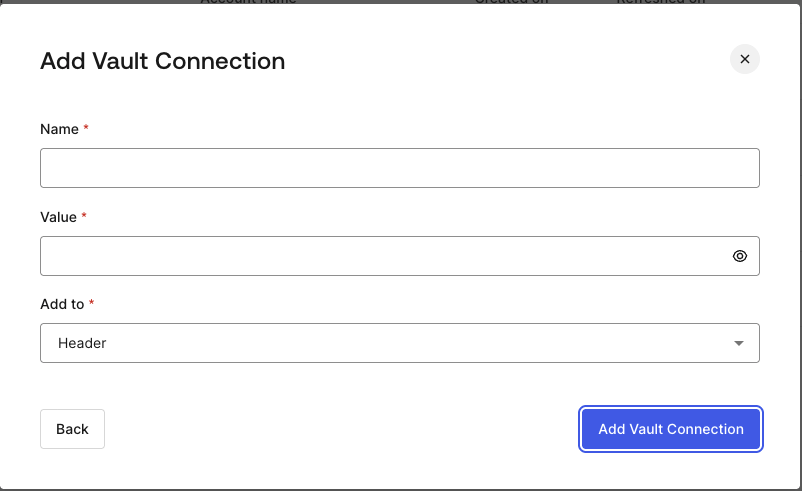
To configure a HTTP Vault Connection using **API Key** authorization, you need to set the required parameters.
<Frame>
  <img src="https://mintcdn.com/docs-staging-chore-gt-workflow/PzoOIgRpU65TZp7z/docs/images/customize/forms/vaults/http-vault-connection-api-key.png?fit=max&auto=format&n=PzoOIgRpU65TZp7z&q=85&s=e3f1636ef18b1f87fe8eb0824f9b3ec6" alt="Dashboard > Actions > Forms > Vault > HTTP " data-og-width="802" width="802" data-og-height="491" height="491" data-path="docs/images/customize/forms/vaults/http-vault-connection-api-key.png" data-optimize="true" data-opv="3" srcset="https://mintcdn.com/docs-staging-chore-gt-workflow/PzoOIgRpU65TZp7z/docs/images/customize/forms/vaults/http-vault-connection-api-key.png?w=280&fit=max&auto=format&n=PzoOIgRpU65TZp7z&q=85&s=68f9e101cb5e582ea8d719631bc30e9a 280w, https://mintcdn.com/docs-staging-chore-gt-workflow/PzoOIgRpU65TZp7z/docs/images/customize/forms/vaults/http-vault-connection-api-key.png?w=560&fit=max&auto=format&n=PzoOIgRpU65TZp7z&q=85&s=809b6a395c97fa5af6ee177e924de59b 560w, https://mintcdn.com/docs-staging-chore-gt-workflow/PzoOIgRpU65TZp7z/docs/images/customize/forms/vaults/http-vault-connection-api-key.png?w=840&fit=max&auto=format&n=PzoOIgRpU65TZp7z&q=85&s=fb292bf19255c09d7ee81abd7db533ba 840w, https://mintcdn.com/docs-staging-chore-gt-workflow/PzoOIgRpU65TZp7z/docs/images/customize/forms/vaults/http-vault-connection-api-key.png?w=1100&fit=max&auto=format&n=PzoOIgRpU65TZp7z&q=85&s=2148c8f2629f005af98336f88ee1392e 1100w, https://mintcdn.com/docs-staging-chore-gt-workflow/PzoOIgRpU65TZp7z/docs/images/customize/forms/vaults/http-vault-connection-api-key.png?w=1650&fit=max&auto=format&n=PzoOIgRpU65TZp7z&q=85&s=6cd0c2cb5b3c2d6393b98b7bd2316d29 1650w, https://mintcdn.com/docs-staging-chore-gt-workflow/PzoOIgRpU65TZp7z/docs/images/customize/forms/vaults/http-vault-connection-api-key.png?w=2500&fit=max&auto=format&n=PzoOIgRpU65TZp7z&q=85&s=f9d4decab67bf780c3ef3fd378dfd1a9 2500w" />
</Frame>

### Input settings

| Parameter | Description                                                                                  |
| --------- | -------------------------------------------------------------------------------------------- |
| Name      | API Key name to be added as Header or Query parameter.                                       |
| Value     | API Key value to be added as Header or Query parameter.                                      |
| Add To    | By default, it's Header. Determines whether to add the API Key as Header or Query parameter. |

## Configure your HTTP Vault Connection for Basic Authentication

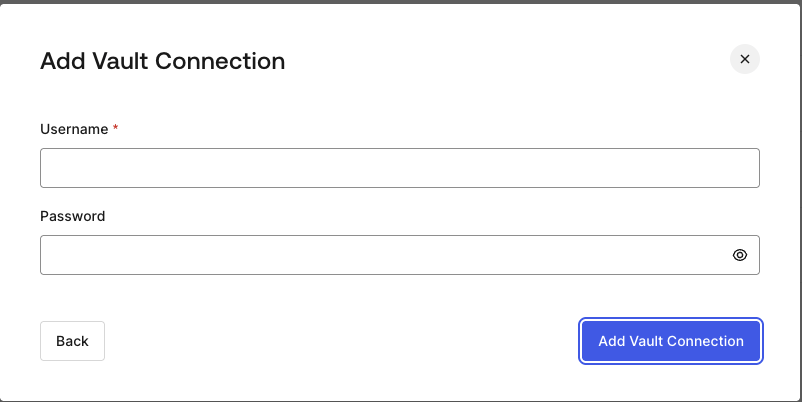
To configure a HTTP Vault Connection using **Basic Auth** authorization, you need to set the required parameters.
<Frame>
  <img src="https://mintcdn.com/docs-staging-chore-gt-workflow/PzoOIgRpU65TZp7z/docs/images/customize/forms/vaults/http-vault-connection-basic-authentication.png?fit=max&auto=format&n=PzoOIgRpU65TZp7z&q=85&s=bf9e7f202a4a000a97dc1a2b14eb6e14" alt="Dashboard > Actions > Forms > Vault > HTTP " data-og-width="802" width="802" data-og-height="402" height="402" data-path="docs/images/customize/forms/vaults/http-vault-connection-basic-authentication.png" data-optimize="true" data-opv="3" srcset="https://mintcdn.com/docs-staging-chore-gt-workflow/PzoOIgRpU65TZp7z/docs/images/customize/forms/vaults/http-vault-connection-basic-authentication.png?w=280&fit=max&auto=format&n=PzoOIgRpU65TZp7z&q=85&s=11617d140d3891158c2fd449ddb663dc 280w, https://mintcdn.com/docs-staging-chore-gt-workflow/PzoOIgRpU65TZp7z/docs/images/customize/forms/vaults/http-vault-connection-basic-authentication.png?w=560&fit=max&auto=format&n=PzoOIgRpU65TZp7z&q=85&s=42f523741cbd1b46ec24dd5a6ec1cf05 560w, https://mintcdn.com/docs-staging-chore-gt-workflow/PzoOIgRpU65TZp7z/docs/images/customize/forms/vaults/http-vault-connection-basic-authentication.png?w=840&fit=max&auto=format&n=PzoOIgRpU65TZp7z&q=85&s=a30908f89b81ec63691c8837d7f6bc99 840w, https://mintcdn.com/docs-staging-chore-gt-workflow/PzoOIgRpU65TZp7z/docs/images/customize/forms/vaults/http-vault-connection-basic-authentication.png?w=1100&fit=max&auto=format&n=PzoOIgRpU65TZp7z&q=85&s=4ad880f3158029e7fb7fb23e3e8587d2 1100w, https://mintcdn.com/docs-staging-chore-gt-workflow/PzoOIgRpU65TZp7z/docs/images/customize/forms/vaults/http-vault-connection-basic-authentication.png?w=1650&fit=max&auto=format&n=PzoOIgRpU65TZp7z&q=85&s=49b421e52f5483a68f4db3a5060c20f1 1650w, https://mintcdn.com/docs-staging-chore-gt-workflow/PzoOIgRpU65TZp7z/docs/images/customize/forms/vaults/http-vault-connection-basic-authentication.png?w=2500&fit=max&auto=format&n=PzoOIgRpU65TZp7z&q=85&s=76c4b25a8dc60e9ab8f4268851583271 2500w" />
</Frame>

### Input settings

| Parameter | Description                                                                                         |
| --------- | --------------------------------------------------------------------------------------------------- |
| Username  | Username to be concatenated and base64 encoded, then added as Basic Authorization Header parameter. |
| Password  | Password to be concatenated and base64 encoded, then added as Basic Authorization Header parameter. |

<Warning>
  HTTP Vault Connection with Basic Auth configuration, is looking forward to replace the currently built-in option at Flows HTTP Request Action.
</Warning>
