> ## Documentation Index
> Fetch the complete documentation index at: https://docs-staging-chore-gt-workflow.mintlify.site/llms.txt
> Use this file to discover all available pages before exploring further.
> Découvrez comment configurer vos connexions Auth0 Vault pour autoriser les requêtes adressées à la Management API.
# Auth0 connexion Vault
Accéder à l’Auth0 Management API
[Créer une application M2M (machine-to-machine)](/docs/fr-ca/get-started/auth0-overview/create-applications/machine-to-machine-apps) autorisée à accéder à l’Auth0 Management API.
N’oubliez pas d’autoriser votre application M2M à accéder à l’Auth0 Management API et de sélectionner les scopes appropriés, conformément au principe du moindre privilège :
* Pour Get User : `read:users`
* Pour Create User : `create:users`
* Pour Update User : `update:users`
Aucune autorisation pour l’Auth0 Management API n’est nécessaire pour envoyer des notifications par l’intermédiaire des providers configurés dans votre tenant Auth0.
Pour configurer une connexion Vault Auth0 pour vos actions de flux Auth0, définissez les paramètres requis à partir de l’application M2M créée précédemment.
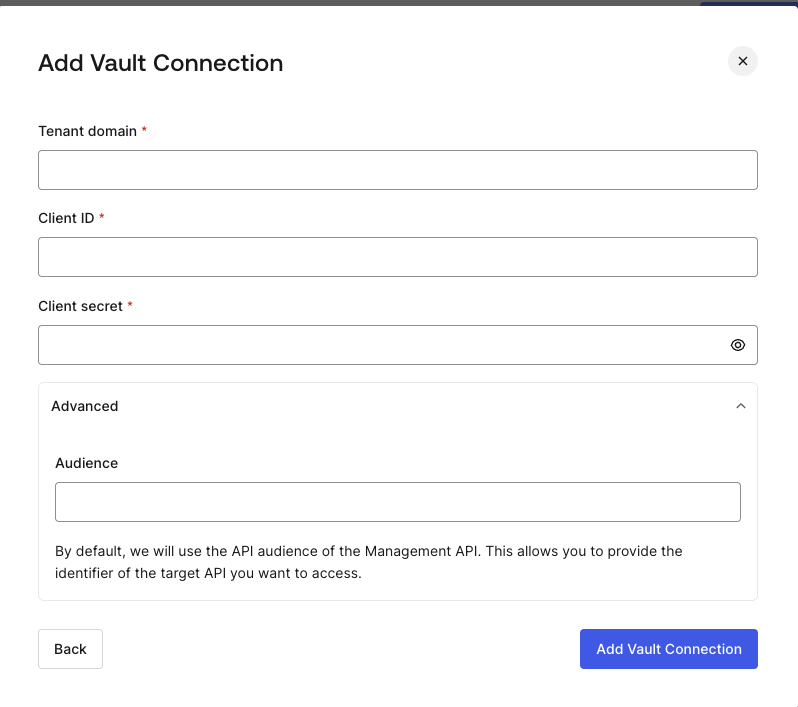 | Paramètre | Description |
| --------------------- | ----------------------------------------------------------------------------- |
| Domaine du tenant | Domaine du tenant de votre application M2M. |
| Client ID | Client ID de votre application M2M autorisée pour l’Auth0 Management API. |
| Client Secret | Client Secret de votre application M2M autorisée pour l’Auth0 Management API. |
| Audience (facultatif) | Audience de l’Auth0 Management API. |
Par défaut, l’Audience sera basée sur le domaine du tenant.
| Paramètre | Description |
| --------------------- | ----------------------------------------------------------------------------- |
| Domaine du tenant | Domaine du tenant de votre application M2M. |
| Client ID | Client ID de votre application M2M autorisée pour l’Auth0 Management API. |
| Client Secret | Client Secret de votre application M2M autorisée pour l’Auth0 Management API. |
| Audience (facultatif) | Audience de l’Auth0 Management API. |
Par défaut, l’Audience sera basée sur le domaine du tenant.